Ellipse
Ellipses and elliptical regions of interest in data coordinates.
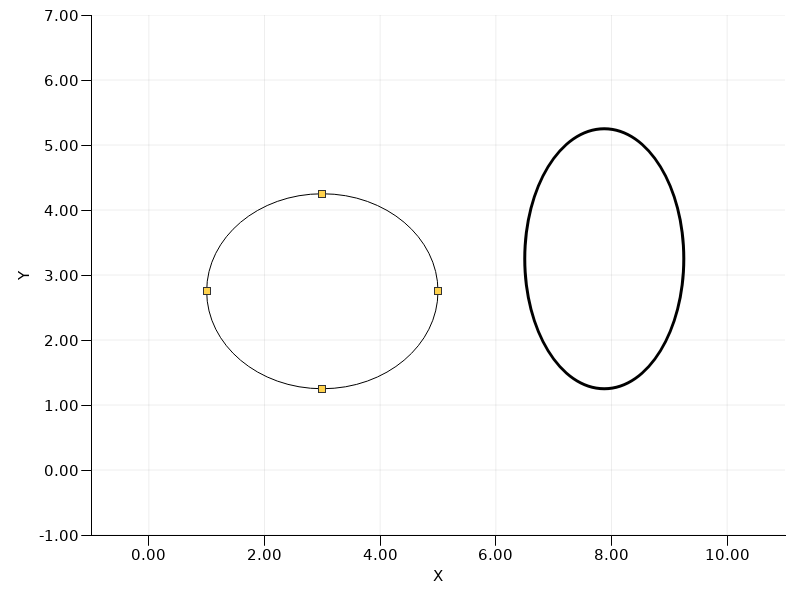
This example demonstrates using Ellipse to draw finite ellipses in data coordinates. The editable ellipse is paired with the EllipseHandles item so it can be selected, moved by dragging its body and resized by dragging its cardinal handles. Clicking empty plot space clears the selection and hides the handles.
 // SPDX-FileCopyrightText: Copyright (c) 2024 Refeyn Ltd and other QuickGraphLib contributors
 // SPDX-License-Identifier: MIT

 import QtQuick
 import QuickGraphLib.GraphItems as QGLGraphItems
 import QuickGraphLib.PreFabs as QGLPreFabs

 QGLPreFabs.XYAxes {
     id: axes

     property rect editableEllipseRect: Qt.rect(1, 1.25, 4, 3)
     property bool ellipseSelected: true

     function moveEditableEllipse(delta) {
         editableEllipseRect = Qt.rect(editableEllipseRect.x + delta.x, editableEllipseRect.y + delta.y, editableEllipseRect.width, editableEllipseRect.height);
     }

     viewRect: Qt.rect(-1, -1, 12, 8)
     xLabel: "X"
     yLabel: "Y"

     MouseArea {
         anchors.fill: parent

         onClicked: axes.ellipseSelected = false
     }
     QGLGraphItems.Ellipse {
         dataRect: Qt.rect(6.5, 1.25, 2.75, 4)
         dataTransform: axes.dataTransform
         fillColor: "transparent"
         strokeColor: "black"
         strokeWidth: 3
     }
     QGLGraphItems.Ellipse {
         id: editableEllipse

         dataRect: axes.editableEllipseRect
         dataTransform: axes.dataTransform
         fillColor: "transparent"
         strokeColor: "black"
         strokeWidth: 1
     }
     QGLGraphItems.EllipseHandles {
         dataRect: axes.editableEllipseRect
         dataTransform: axes.dataTransform
         handleMode: QGLGraphItems.EllipseHandles.Cardinal
         movable: true
         selected: axes.ellipseSelected

         onBodyClicked: axes.ellipseSelected = true
         onHandleClicked: axes.ellipseSelected = true
         onMoved: delta => axes.moveEditableEllipse(delta)
         onResized: dataRect => axes.editableEllipseRect = dataRect
     }
 }